Fesco Bill Check Online 14-digit in Mobile 2026
Looking for your FESCO bill? You are at the right place. You can now online check FESCO bill 2026 and download or print it for payment or other purposes. Check your FESCO bill easily at fescobillcheckpk.com using your 14-digit Reference Number or 10-digit Customer ID and receive your bill in just a few seconds.
Check Your FESCO Bill Online
Enter your 14-digit FESCO reference number below to check your electricity bill online.
Enter your 14-digit reference number to continue.
FESCO was set up in 1998 its full name Faisalabad Electric Supply Company. It works under WAPDA (Water and Power Development Authority) and supplies electricity to a huge population across central Punjab. FESCO operates under a license from NEPRA (National Electric Power Regulatory Authority), which is the body that sets and checks electricity rules across Pakistan.
How to Check Your FESCO Bill in 2026
Step 1: Find your Reference Number or Customer ID on Bill Paper or pdf. Your 14-digit Reference Number is usually printed on the left side of the bill, while your 10-digit Customer ID is printed above it as shown in image below. If you still can’t find the Reference Number, look for the highlighted box on the bill. Your Reference Number is shown there.
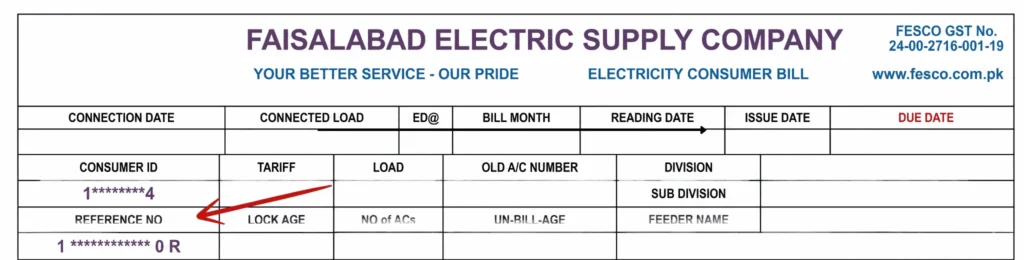
Step 2: Enter your Reference Number or Customer ID that you have found on Fesco Bill paper in the box at the top of website and just press enter check image below for demonstration
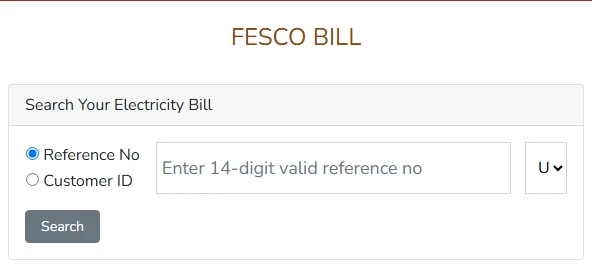
Step 3: View Your Bill
Your FESCO bill will appear online within a few seconds after hitting enter. You can see your current bill amount, due date, and other bill details. TThe online bill usually arrives 2 to 3 days before the paper bill.
Can I check my FESCO bill using CNIC, name, or meter number?
No. checking of FESCO Bill requires your Reference Number or Customer ID. If you don’t have any, ask someone who uses the same connection or just visit your nearest FESCO office with your CNIC, or contact the FESCO helpline for help.
What if I get a “Bill Not Found” message?
This usually happens because the Bill Refrence number was entered incorrectly. Make sure your 14-digit Reference Number or 10-digit Customer ID is correct. If your FESCO connection is new or was recently transferred, it may take some time to appear online. You can also try the other number (consumer id). If it still doesn’t work, contact the FESCO helpline for help.
How to Check FESCO Bill Paid or Not?
If you have recently paid your FESCO electricity bill, you can easily check if your bill have been paid or not using your phone, tablet, or computer in just a few minutes.
Follow the steps below to check if your bill is paid or not

Enter Your Reference Number
Enter your 14-digit Reference Number or 10-digit Customer ID in the bill checker above. You can find the Reference Number on the left side of your FESCO bill, above your name and address. After entering the number, click Check Bill to continue.
View Your Bill Details
Your latest FESCO bill will appear on the screen with the important information. You can check your consumer name, reference number, billing month, due date, units used, total bill amount, and current bill status.
Check Your Payment Status
If you have already paid your FESCO bill, the payment status will be shown when the payment has been updated. If the bill still shows as unpaid, allow some time for the payment to appear in the system.
Payment Status Not Updated?
If your payment still shows as unpaid, wait 24–48 hours for the status to update. Check your banking app or mobile wallet and keep your payment receipt. If the payment is still not updated after 48 hours, contact the FESCO helpline and provide your Reference Number and payment date.
Check Your FESCO Bill History
Need to review your previous bills? You can also check your last 12 months of bill history to compare past usage and payment amounts. Check your current bill above and look for the bill history section to review your previous records.
How to Apply for FESCO Bill SMS Service
Are you tired of checking your FESCO bill every month? You can now get your bill directly through SMS or email. Just register your mobile number to receive an SMS when your new bill is ready. You can also add your Reference Number and email address to receive your bill by email. This way, you can get your FESCO bill easily without checking it every month.
Estimate Your Bill With Our Free FESCO Bill Calculator
Don’t want to wait for your FESCO bill? Use our FESCO Bill Calculator to get an estimated bill quickly. Just enter the number of units you used, and the calculator will estimate your bill including the usual FESCO taxes and charges.
It’s useful for planning your budget after changes in electricity usage or for comparing your estimated bill if you think there’s a billing mistake.
Just remember, this is an estimate, not your official bill. Your real bill can be a little different because of extra charges or adjustments FESCO adds that month.
How to Pay Your FESCO Bill Online
Once you check your FESCO bill here, you can easily pay it in just a few simple steps.
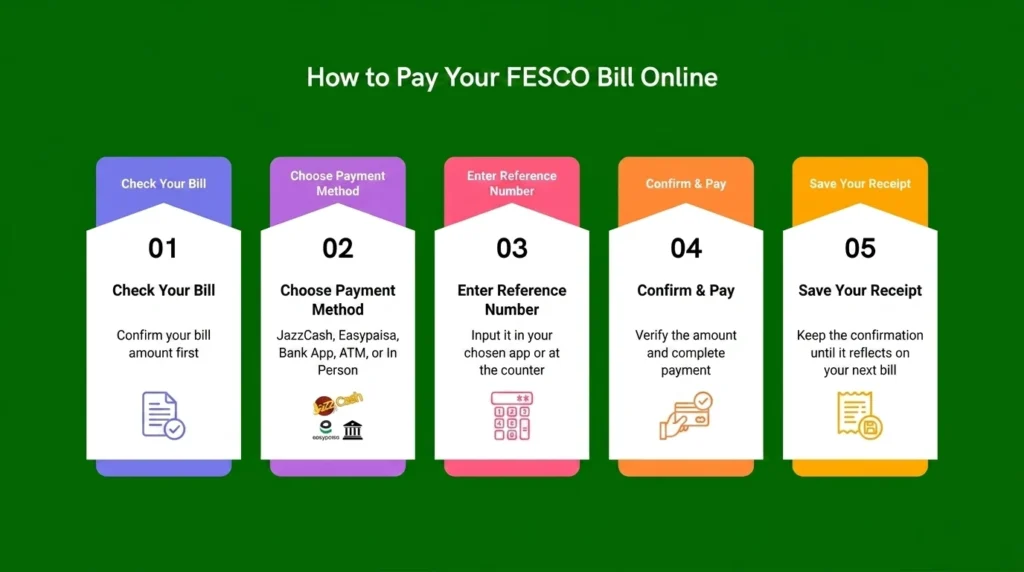

- JazzCash or Easypaisa: Open the app → Bill Payment → Electricity → FESCO. Enter your Reference Number, pay the bill, and save the confirmation as your receipt.
- Bank App: Go to Bill Payment → Electricity → FESCO, enter your Reference Number, and pay.
- ATM: Enter your Reference Number, verify the bill amount, pay, and collect the printed receipt.
- Credit Card: Pay through most banking apps by selecting Credit Card as the payment method.
- In Person: Visit any bank branch accepting FESCO/WAPDA bill payments and pay with your printed bill.
Tip: Keep your payment receipt or confirmation message until the payment appears on your next bill.
FESCO Bill Taxes and Charges Explained
Your FESCO bill includes more than just electricity units multiplied by the applicable rate. Here are the main taxes, adjustments, and charges you may see on your bill.
FESCO Surcharges
Additional charges that are added to your electricity bill under the FESCO Surcharges section.
FPA (Fuel Price Adjustment)
A monthly adjustment based on changes in the fuel costs used to generate electricity.
Fixed Charges
A fixed amount based on your connection type. This charge can apply even when your electricity usage is low.
Energy Charges
The main cost of electricity based on the number of units you consumed during the billing period.
GST (General Sales Tax)
A government sales tax applied to the bill. It is commonly shown at around 17%, depending on the applicable billing rules.
Electricity Duty
A government tax that is usually calculated at around 1.5% of the applicable energy charges.
T.R. Surcharge
The Tariff Rationalization Surcharge helps cover the tariff gap managed by NEPRA and the Government of Pakistan. The applicable rate can differ between electricity distribution companies.
F.C. Surcharge
The Financing Cost Surcharge helps repay loans taken by power companies. It is commonly charged at around Rs. 0.43 per unit. For example, 100 units would add roughly Rs. 43 under this charge.
T.V. Fee
A fixed fee of about Rs. 35 added to electricity bills to help fund Pakistan Television (PTV), regardless of whether you own a TV.
Quarterly Tariff Adjustment
The Quarterly Tariff Adjustment (QTA) is applied periodically to reflect changes in electricity generation costs, tariffs, or other approved adjustments.

If you have a TOU or TOD meter, your FESCO bill depends on the time you use electricity. Peak hours have higher rates, while off-peak hours usually have lower rates. Using heavy appliances like your AC, washing machine, or water heater during off-peak hours can help you reduce your FESCO bill.
FESCO Bill Correction | Step by Step Guide
If your bill has a mistake, like a wrong name, address, arrears that don't match, or an incorrect meter reading, you don't need to worry, it can be fixed.
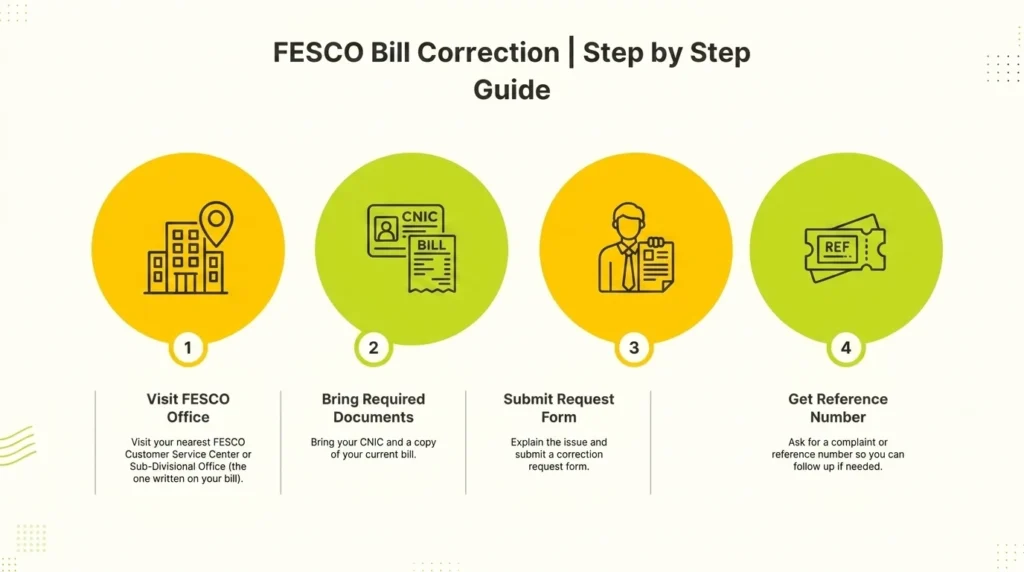
- Visit your nearest FESCO Customer Service Center or Sub-Divisional Office (the one written on your bill).
- Bring your CNIC and a copy of your current bill.
- Explain the issue and submit a correction request form.
- Ask for a complaint or reference number so you can follow up if needed.
Correction requests are usually handled at the sub-division level, so going there directly is often faster than calling the head office.
Common FESCO Bill Issues & their Solutions
A few problems come up again and again, so here's a quick fix for each one:
- Bill not received? Just check and download your duplicate bill from this website instead of waiting for the paper copy.
- Bill higher than usual? Compare this month's units with your past few bills, and try to avoid heavy appliance use during peak hours going forward.
- Meter reading looks wrong? Compare the reading on your actual meter with the "Recorded Reading" printed on your bill. If they don't match, contact your local FESCO Sub-Division office.
- Paid but bill still shows unpaid? This is normal for the first 24-48 hours after payment. If it's still not updated after that, contact the FESCO helpline with your payment proof.
FESCO Complaints, Helpline and New Connections
Head Office Address FESCO Head Office, West Canal Road, Abdullahpur, Faisalabad, Pakistan
FESCO Customer Support and Helpline | for fesco complaints contact here
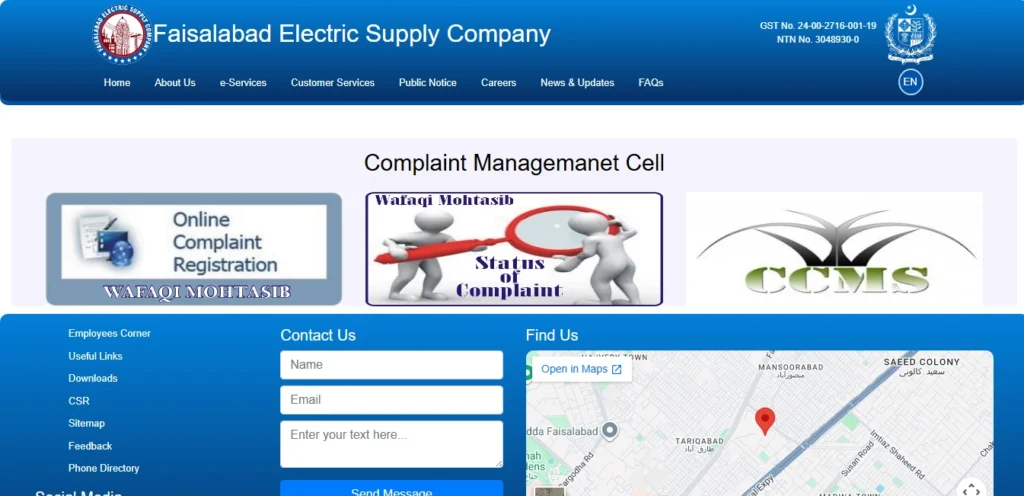
If you have any questions, emergencies, or complaints, you can reach FESCO directly using the numbers below:
| Phone #1 | +92 (41) 9220184-9220229 |
| Phone #2 | +92 (41) 9220290 |
| Phone #3 | +92 (41) 9220176 |
| UAN No. | 0800-66554 |
| Fax | +92 (41) 9220233 |
| complaint@fesco.com.pk |
For a faster response on billing or meter issues, it's usually quicker to contact your local Sub-Division office directly instead of the head office, since they can act on the issue right at the source.
To get a new FESCO connection or shift your meter, apply online or at your Sub-Divisional Office. Submit your CNIC, ownership/tenancy proof, and photos. After a site visit, FESCO will provide a cost estimate. Once you pay and submit proof, your meter will be installed and activated. Processing time may vary by area and season.
FESCO Coverage Areas
FESCO supplies electricity to 8 districts of Punjab. Here is the full list along with the main cities and tehsils under each one:
| District | Main Cities / Tehsils Covered |
|---|---|
| Faisalabad | Faisalabad City, Jaranwala, Tandlianwala, Samundri, Chak Jhumra |
| Jhang | Jhang City, Shorkot, Ahmadpur Sial, 18 Hazari |
| Toba Tek Singh | Toba Tek Singh, Gojra, Kamalia, Pirmahal |
| Chiniot | Chiniot City, Lalian, Bhawana |
| Sargodha | Sargodha City, Bhalwal, Kot Momin, Shahpur, Sillanwali |
| Khushab | Khushab, Jauharabad, Noorpur Thal, Quaidabad |
| Bhakkar | Bhakkar City, Darya Khan, Kaloor Kot, Mankera |
| Mianwali | Mianwali City, Isakhel, Piplan |
If your city or town is listed above, you're in the right place, and the tool at the top of this page will work for you.
FESCO Services
Here's a quick look at everything you can do on this page:
| Attribute | Details |
|---|---|
| Company Name | FESCO (Faisalabad Electric Supply Company) |
| Established | 1998 |
| Category | Electricity Distribution |
| Industry | Distribution of Electricity |
| Office Location | Faisalabad |
| Head Office | Faisalabad, Pakistan |
| Owner | Government of Pakistan |
| Employees | 14,000+ |
| CEO | Engineer Muhammad Amir |
| Areas Covered | Central Pu |
- Check and download your FESCO bill online
- Print your FESCO bill or duplicate bill
- Check FESCO bill coverage areas
- Check if your FESCO bill is paid or not
- Apply for FESCO SMS bill service
- Request a FESCO bill correction
- Estimate your bill with the FESCO Bill Calculator
- Understand your FESCO taxes and charges
- Find FESCO helpline numbers and head office details
You will find each of these explained in detail as you scroll down this page.
Key Features of FESCO Online Bill
Here's what you get when you check your bill on this website:
- Easy access anytime — check your FESCO bill from anywhere, any time, without visiting an office
- Mobile friendly — works smoothly on your phone, tablet, or computer, no app needed
- Complete bill details — see your due date, units consumed, meter reading date, and bill issue date all in one place
- 12-month bill history — look back at your past bills and payments whenever you need them
- Download and print — save your bill as a PDF or print a duplicate copy in seconds
- Multiple payment options shown clearly — JazzCash, Easypaisa, bank apps, ATM, and credit card, all explained on this page
- SMS and email alerts — get notified the moment your new bill is ready, instead of checking manually every month
Not in a FESCO Area?
If you are checking a bill for Lahore, Gujranwala, Islamabad, Rawalpindi, or another area outside FESCO’s service area, you may need a different electricity company. LESCO serves Lahore, GEPCO serves Gujranwala, and IESCO serves Islamabad and Rawalpindi. These bill websites can look similar, so make sure you are using the correct company for your area before checking your bill.
Is FESCO Electricity Bill or Gas Bill?
One quick but important thing: FESCO only gives electricity. It has nothing to do with gas bills.
If you are actually looking for your gas bill, that is handled by SNGPL in this area, not FESCO. These are two completely separate bills, different company, different account number, different payment system. If you searched for a "FESCO gas bill," this is most likely the mix-up, and SNGPL's own website is where you will actually find that bill.
FESCO Latest News
Privatisation EOI deadline extended (August 2026): The Privatisation Commission extended the deadline to August 7, 2026, giving investors more time to submit Expressions of Interest (EOIs) for FESCO's privatisation.
Rs. 354 million spent on power infrastructure: In May 2026, FESCO completed development projects worth over Rs. 354 million, including electrifying 82 villages and upgrading transmission and distribution lines.
1,685 transformers repaired: FESCO repaired 1,685 transformers through its Faisalabad, Sargodha, and Mianwali workshops to improve power reliability and reduce outages.
Special Eid monitoring: FESCO set up a monitoring cell and deployed senior staff during Chand Raat and Eid to ensure uninterrupted electricity and quick complaint handling.